Пенетрационно тестване на уеб приложения: Какво трябва да знаете преди да изберете доставчик
Alexander Sverdlov
Анализатор по сигурността

Защо уеб приложенията са риск №1 за киберсигурността днес
Уеб приложенията са най-атакуваната входна точка в съвременната киберсигурност. Независимо дали управлявате SaaS платформа, електронен магазин или вътрешен уеб портал, приложението ви е изложено на света - и на атакуващите.
https://youtu.be/X6jp3Q41Duc
📈 Проблемът в числа
-
86% of web applications tested had at least one exploitable vulnerability (Positive Technologies).
-
70% of successful cyberattacks in 2023 exploited web apps (IBM Cost of a Data Breach Report).
If your business relies on a web-facing application, penetration testing is no longer optional. It’s a fundamental requirement - for security, compliance, and client trust.
🔍 What Is Web Application Penetration Testing?
Web app penetration testing simulates real-world attacks on your application to identify and safely exploit vulnerabilities before malicious actors do.
Unlike automated scans, this involves:
-
Manual testing
-
Advanced logic-based attacks
-
Context-aware exploitation
-
Business logic abuse
It’s not just about finding weak passwords - it’s about discovering how an attacker could chain multiple flaws together to compromise your systems and data.
🛠️ Part 2: The Deep Technical Process
A serious penetration test follows a structured methodology. Here’s how professionals do it:
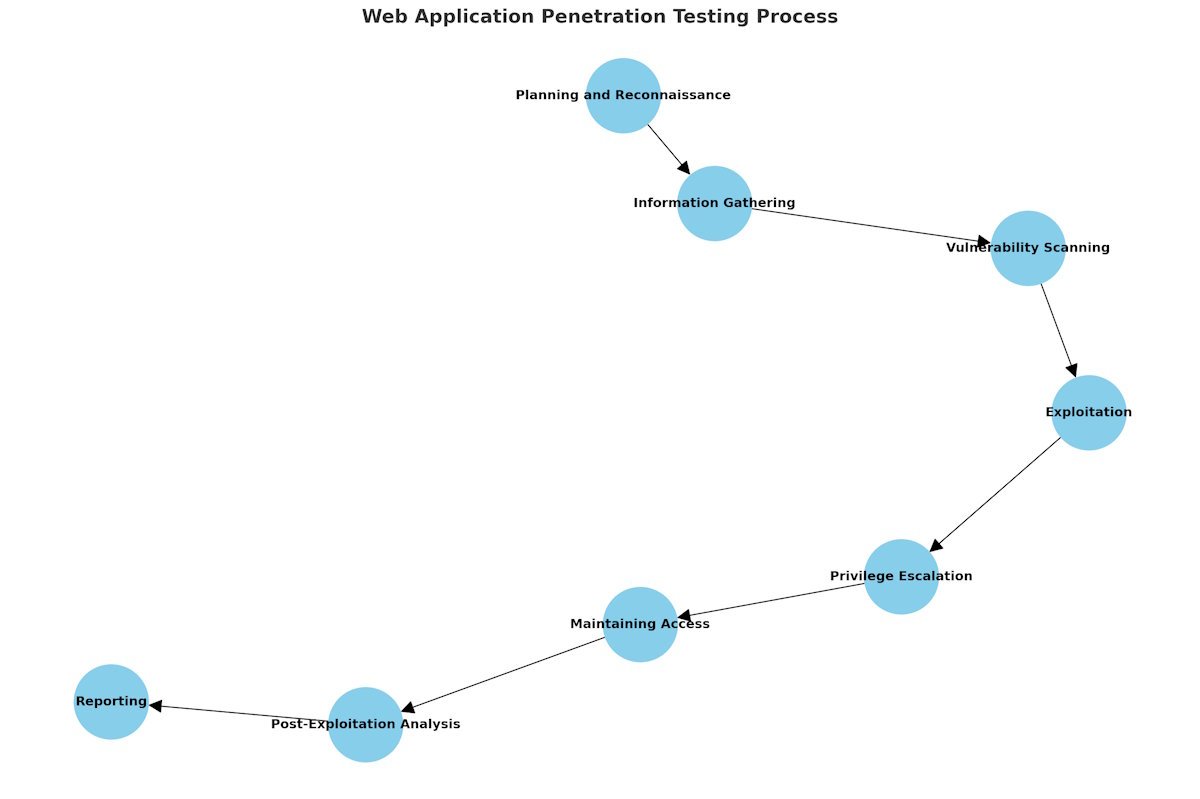
✅ 1. Information Gathering (Reconnaissance)
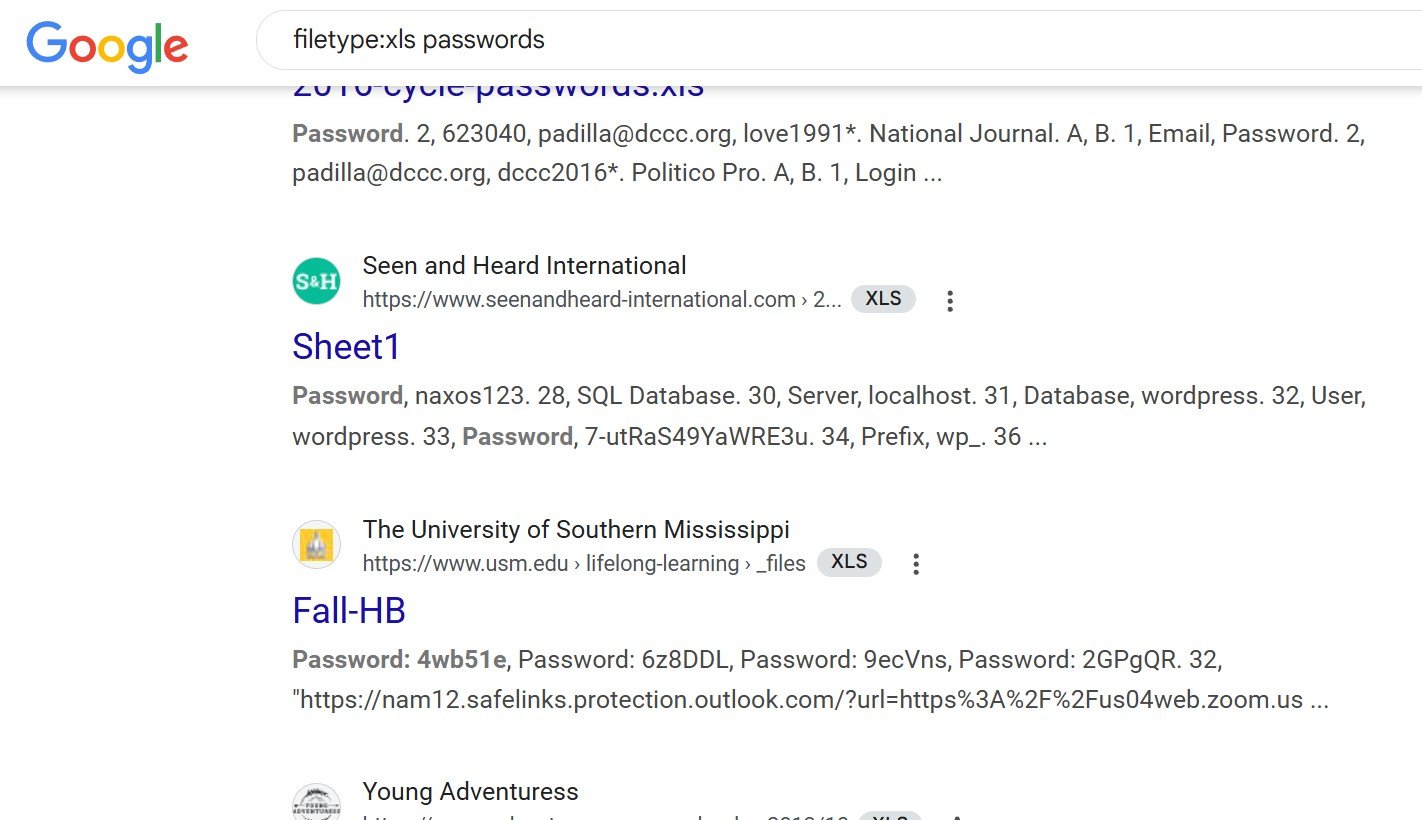
Tools & Methods:
-
Google Dorking
-
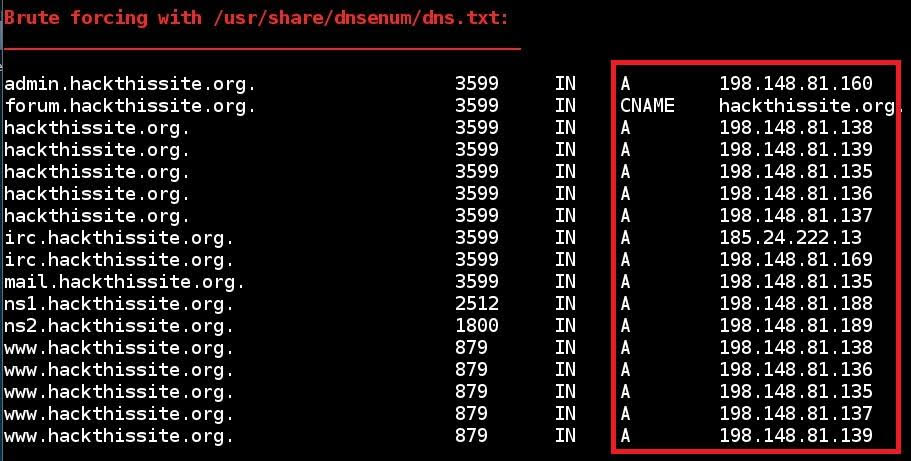
DNS Enumeration:
dnsenum
-
Subdomain Discovery:
Sublist3r,Amass -
WHOIS, Shodan, Certificate Transparency Logs
✅ 2. Mapping the Application
-
Identify endpoints, technologies (e.g., PHP, React, Node.js)
-
Use tools like
WappalyzerandBurp Suite
✅ 3. Automated Scanning
To identify common CVEs:
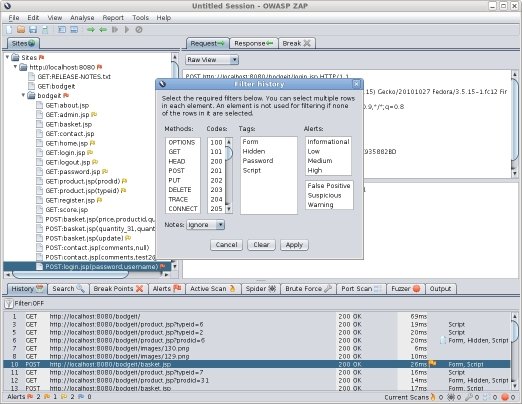
But remember: scanners miss logic flaws.
✅ 4. Manual Testing
This is where experienced testers shine:
-
Bypassing authentication mechanisms
-
Testing for parameter tampering
-
Abuse of forgotten endpoints
-
Chained attack scenarios
Focus areas:
| Area | Examples |
|---|---|
| Input Validation | XSS, SQLi, Command Injection |
| Authentication | Broken Auth, 2FA Bypass |
| Authorization | IDOR (Insecure Direct Object References) |
| Session Mgmt | Session Fixation, Token Theft |
| Business Logic | Abusing workflows to gain access, discounts, or elevate permissions |
✅ 5. Exploitation
Careful, controlled execution of:
-
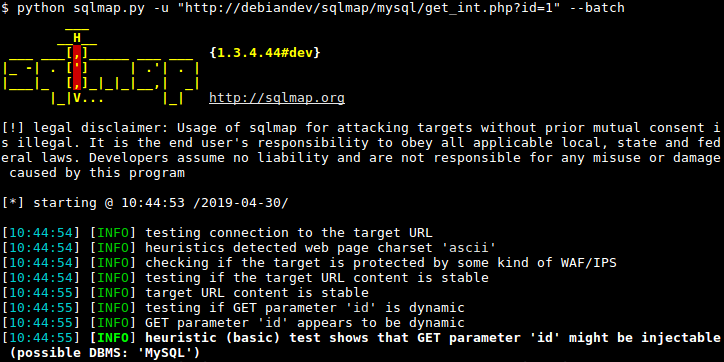
SQL Injection (with tools like
sqlmap)
-
File Upload Bypass
-
XSS to Session Hijacking
-
RCE (Remote Code Execution)
Goal: Simulate what a real attacker would gain - without harming your systems.
✅ 6. Post-Exploitation (Optional)
-
Check for lateral movement
-
Privilege escalation
-
Pivoting inside your network if allowed by scope
✅ 7. Reporting
Not just a list of CVEs. A good report includes:
-
Risk-ranked vulnerabilities (CVSS + business impact)
-
Screenshots of exploitation
-
Proof-of-Concepts (PoCs)
-
Developer remediation guidance
🧠 Why Manual Testing Still Matters
Even the best scanner won’t:
-
Understand business logic
-
Chain multiple minor bugs into a critical exploit
-
Spot a cleverly hidden privilege escalation
Manual testing is what separates a $500 scan from a $10,000 professional test - and it’s worth every penny if you care about real-world protection.
📜 Part 3: Regulatory and Compliance Requirements
Many industries and standards require regular penetration testing. Here’s a breakdown:
| Standard | Penetration Test Requirement | Link |
|---|---|---|
| PCI-DSS | Annual test and after major changes | PCI DSS v4.0 |
| SOC 2 | Required for security principle | AICPA SOC 2 |
| HIPAA | Required for risk analysis (if ePHI is exposed) | HHS HIPAA Guidelines |
| ISO 27001 | Required for Annex A.12 (Operations Security) | ISO |
| NIST SP 800-53 | Requires regular testing in multiple controls | NIST Controls |
| GDPR | “Appropriate technical measures” include testing | GDPR Article 32 |
If your clients ask for SOC 2, PCI, or HIPAA - you’ll need evidence of recent and reliable pen testing.
Choosing the Right Penetration Testing Provider
Not all pen tests are created equal.
Some companies run a cheap scanner, slap your logo on a PDF, and call it a day. Others dig deep, simulate real-world attackers, and actually help your team fix what they find.
The difference? Often $500 vs $15,000 - and a mountain of risk in between.
🧠 What Makes a Great Penetration Testing Partner
Here’s what to look for in a serious web app pentesting vendor:
| Criteria | Why It Matters |
|---|---|
| Manual Testing | Scanners miss logic flaws and chained exploits. |
| Scoping Expertise | Should help you define test boundaries and prioritize assets. |
| Clear Deliverables | You need a report with PoCs, risk ratings, and remediation steps. |
| Remediation Support | Will they work with your dev team after the report? That’s real value. |
| Certifications (OSCP, CREST, etc.) | Shows they know what they’re doing, not just pushing buttons. |
| Reputation + References | Ask for testimonials, case studies, or past client results. |
| Business Risk Understanding | Can they speak your language - not just “CVE-2023-XXXX”? |
❌ Red Flags to Watch Out For
-
Automated Scan + Fancy Report = “Pentest”
If they don’t mention manual testing or business logic, walk away. -
No Scoping Call
A real test needs a real conversation. No form can capture everything. -
No Post-Test Support
Fixing vulnerabilities takes time. If they ghost you after delivery, it’s a bad sign. -
All Talk, No Proof
Anyone can say “we’re trusted by enterprises.” Ask for real, redacted reports or sample findings.
💸 Part 5: Penetration Testing Costs - What You’re Really Paying For
📦 Pricing Breakdown by Test Type
| Test Type | Description | Estimated Cost |
|---|---|---|
| Automated Scan | Simple scan + basic report | $500 – $1,000 |
| Light Manual Test | 1-2 testers for 2-5 days | $3,000 – $6,000 |
| Full Manual Web App Pentest | Deep testing with chained exploit attempts | $7,000 – $20,000 |
| Comprehensive Engagement | Includes retesting, remediation support, compliance mapping | $15,000 – $30,000+ |
Factors that affect price:
-
Number of unique pages or endpoints
-
Complexity (auth, roles, workflows)
-
Scope (prod + staging? multiple apps?)
-
Regulated industry? (HIPAA, PCI, etc.)
-
Is retesting included?
💡 Tip: Always ask, “Is retesting included in your quote?”
Fixing issues and getting a clean report often costs extra if it’s not stated upfront.
💰 Should You Choose a Cheap Provider?
If your goal is:
-
Checking a compliance box
-
Getting a low-budget MVP tested quickly
-
Testing a demo with no real users
...then a cheaper scan might make sense.
But if your app:
-
Stores sensitive customer data
-
Powers your revenue (SaaS, eCommerce, CRM)
-
Faces real threat actors
-
Is required to pass audits (SOC 2, ISO, PCI)
...then you need real testing.
Cutting corners here is like buying cheap brakes for a Ferrari.
🧾 What a Good Pen Test Proposal Should Include
Before you sign anything, make sure the quote includes:
| Item | Description |
|---|---|
| Scope of Testing | Pages, features, environments, user roles |
| Testing Techniques | Manual vs automated, tools used |
| Duration | Start and end dates, days of actual testing |
| Team Size & Expertise | Who’s doing the work? What are their credentials? |
| Reporting | Executive summary + technical deep dive |
| Remediation Support | Time allocated for answering questions post-delivery |
| Retesting | One round included? Timeline for it? |
| Confidentiality | NDA or legal agreements for data handling |
| Methodology | OWASP Top 10, NIST 800-115, or custom methodology |
If they can’t show you these details, you’re not dealing with professionals.
What Happens If You Skip Penetration Testing
Many small and medium businesses wait until after a security incident to take testing seriously.
Here’s what that delay usually costs:
🧨 1. Missed Vulnerabilities Become Breaches
Unpatched vulnerabilities (like CVE-2023-34362) were used in real-world attacks months before most companies responded.
"We didn’t know we were exposed"
…is not a defense when your client data leaks.
⚖️ 2. Legal and Regulatory Penalties
If you handle:
-
Credit cards → PCI-DSS
-
Healthcare data → HIPAA
-
Financial records → GLBA, SOX
-
EU citizen data → GDPR
...then you’re required to prove “appropriate technical controls.”
Failure to test could trigger audits, fines, and lawsuits.
🧾 Example: In 2022, a mid-size healthcare SaaS paid $1.4M in HIPAA fines after a breach that could’ve been prevented with routine pentesting.
🚪 3. Lost Deals and Missed RFPs
Enterprise clients and government contracts often require recent pen test reports in their security questionnaires.
No report = no deal.
💣 4. Public Reputation Damage
The press won’t mention that you skipped testing - they’ll just report that:
-
You got hacked.
-
Customer data leaked.
-
Your app was insecure.
And you’ll be in damage control mode for months.
🧠 Executive Често задавани въпроси: What Your CEO, CISO, or CTO Might Ask
💬 “Why can’t we just use a vulnerability scanner?”
Scanners are useful - but limited. They can’t detect:
-
Business logic flaws
-
Role abuse
-
Broken access control
-
Session mismanagement
-
Chainable exploits
A good pen test does all that - and more.
💬 “Can we afford this?”
The better question: Can you afford not to?
💥 Average cost of a web app breach = $4.35M (IBM 2023)
✅ Cost of a good pentest = $7K–$20K
That’s a 0.5%–1% insurance premium to avoid bankruptcy-level loss.
💬 “Will this disrupt our production systems?”
No - if scoped properly.
Professional testers:
-
Work during low-traffic hours
-
Avoid destructive payloads
-
Test in staging where possible
-
Follow strict engagement rules
💬 “What do we do after the test?”
-
Review the report with your dev team
-
Fix the issues ranked Critical and High
-
Schedule a retest (if not included, budget for it)
-
Share the final report (redacted) with clients or auditors as needed
🧾 Final Checklist: Choosing a Web Application Pentest Provider
| Question | Must-Have Criteria |
|---|---|
| Do they offer manual testing? | Yes |
| Do they understand our tech stack? | Yes |
| Can they explain findings in business terms? | Yes |
| Do they include remediation support? | Ideally |
| Is retesting included in the quote? | Preferably |
| Do they have real credentials (OSCP, CREST)? | Strong yes |
| Are reports actionable and developer-friendly? | Must be |
| Are they vendor-agnostic (no upselling tools)? | Yes |
| Do they have references, case studies, or real results? | Always |
| Do they follow a recognized methodology (OWASP/NIST)? | Yes |
Deep Dive Into the Technical Process - What Real Pentesters Actually Do
Most business owners or even CTOs never see what goes on during a manual penetration test. You get a report, maybe a few screenshots, but what happens in the middle?
This section pulls back the curtain. We’ll walk you through real-world technical techniques used during a professional, manual web application penetration test - far beyond what scanners can catch.
🔍 1. Fuzzing and Input Discovery
Fuzzing is the process of sending malformed, unexpected, or intentionally invalid data to inputs to observe how the application behaves.
Professional testers use:
-
ffuf– For directory/file brute forcing -
Burp Suite Intruder– To inject payloads into parameters -
wfuzz– For URL and parameter fuzzing
Examples:
-
Fuzzing an upload endpoint with different file types to bypass MIME filters
-
Fuzzing GET and POST parameters for blind XSS or error leakage
-
Discovering undocumented API routes (e.g.,
/api/v1/exportAllUsers)
🔑 2. Authentication & Session Attacks
Authentication mechanisms are tested for:
-
Weak session tokens (guessable or predictable)
-
Lack of brute-force protection
-
2FA bypasses
-
Account takeover via password reset flaws
Tools and techniques:
-
jwt_tool– JWT tampering, signature bypasses -
Manual cookie poisoning
-
Password spraying using
hydraorburpsuite -
Cookie replay and fixation attacks
Testers look at:
-
Can I log in as someone else without knowing their password?
-
Can I reuse expired or tampered tokens?
-
Can I guess valid session IDs?
Example:
A SaaS app used base64-encoded JSON for sessions. A tester modified their user ID and accessed the CEO’s account.
🔐 3. Authorization Testing (Access Control Failures)
Once logged in, testers look for privilege escalation and horizontal access flaws.
Manual methods include:
-
Changing numeric IDs in URLs:
/invoice/1001 → /invoice/1002 -
Role flipping: modifying JWT claims from
role=viewertorole=admin -
Modifying GraphQL queries to fetch unrelated data
These flaws often bypass even the best WAFs and go undetected by scanners.
Examples:
-
Accessing another user’s files via S3 bucket path manipulation
-
Changing
user_idin POST data to retrieve another user’s billing history -
Performing admin actions through hidden API routes
💣 4. Advanced Exploitation Techniques
Now we go beyond simple XSS and SQLi. Skilled testers simulate full kill-chain attack scenarios, including:
a. SSRF (Server-Side Request Forgery)
Used to:
-
Access internal-only endpoints
-
Enumerate AWS metadata at
http://169.254.169.254 -
Exploit internal admin panels
Tools: Burp Collaborator, Interactsh, ssrfmap
b. Template Injection
Exploits misconfigured rendering engines like Jinja2 or Freemarker:
-
Payload:
{{7*7}}→ Should return49if vulnerable -
May lead to RCE (Remote Code Execution)
c. DOM-based XSS
Exploits JavaScript logic flaws on the client side. Tools: XSStrike, browser DevTools, manual analysis
d. Chained Attacks
Example:
-
Discover a path traversal
-
Use it to read
.envfile -
Extract DB creds
-
Dump the database
-
Reset admin password
-
Log into admin panel
🌐 5. Testing APIs: REST, GraphQL, and Beyond
APIs are often more vulnerable than front-end interfaces - yet rarely tested properly.
Key risks:
-
Lack of rate limiting
-
Excessive data exposure
-
BOLA/IDOR flaws
-
Improper token validation
Manual testers use:
-
GraphQL Voyagerto map schema -
[
Burp Suite Repeater] to modify and replay GraphQL queries
Checklist:
| API Testing Focus | Details |
|---|---|
| Input validation | SQLi, XSS, CRLF injection |
| Authentication | Token expiration, refresh logic |
| Rate limiting | Account lockout, brute force |
| Filtering bypass | Can users query unauthorized fields? |
| Swagger/OpenAPI | Does the spec expose undocumented endpoints? |
☁️ 6. Cloud Application and Serverless Security Testing
Cloud-based applications and microservices come with new attack surfaces:
-
Public S3 buckets
-
IAM misconfigurations
-
Secrets in Git repos or CI/CD pipelines
Testers evaluate:
-
Misconfigured permissions (
*:*in IAM) -
API Gateway bypasses
-
Leaked keys in client-side JavaScript
-
Insecure Lambda functions (e.g., Node.js with
eval())
Tools:
-
ScoutSuite– AWS/Azure/GCP security audits -
Pacu– AWS exploitation framework -
TruffleHog– Detects secrets in code
Example scenario:
A frontend exposed an API key in JS. The key had write access to a production S3 bucket. A tester uploaded a malicious JavaScript file, leading to XSS for all visitors.
🧪 7. Retesting and Verification
After fixes, testers perform targeted retesting:
-
Re-execute original payloads
-
Validate implementation (not just patch version)
-
Look for regressions or new issues introduced during fixes
Good pentesters don’t just say “fixed.” They prove it.
Deliverables:
-
Updated status report
-
Confirmed resolution for each finding
-
Optional video proof or new PoC if issues persist
🔁 8. Methodologies and Toolkits Compared
| Framework / Tool | Use Case | Link |
|---|---|---|
| OWASP Testing Guide | Industry standard baseline | OWASP |
| NIST 800-115 | Federal methodology | NIST |
| Burp Suite Pro | Intercept, fuzz, replay, scan | Burp Suite |
| ZAP (OWASP) | Free scanning + automation | ZAP |
| sqlmap | SQL injection exploitation | sqlmap |
| Amass/Sublist3r | Subdomain discovery | Amass |
| Nuclei | Template-based vulnerability scanning | Nuclei |
🧠 Final Takeaways from the Technical Trenches
-
Scanners alone won't cut it.
-
Manual pentesting is about logic, chaining, and creativity - not just signatures.
-
Cloud and API threats are rising faster than traditional app flaws.
-
Retesting is not optional - many “fixes” just move the problem.
-
A real tester thinks like an attacker, but reports like a partner.
🎯 Your Application Is the Front Door - Lock It Right
You’ve invested in building your platform, your product, your customers’ trust.
But if your web application is vulnerable, everything is at risk.
-
Compliance requires testing.
-
Clients demand proof.
-
Hackers need just one mistake.
A professional web application penetration test isn’t just a checkbox.
It’s the most practical step you can take to protect your business from data loss, brand damage, legal trouble, and lost revenue.
🔐 Ready to take the first step?
We offer:
✅ Manual web application testing
✅ Business logic + privilege abuse checks
✅ Compliance-ready reports
✅ Remediation support
✅ Quiet, discreet, expert-level engagement
👉 Schedule a free consultation
Or download our Pentest Readiness Checklist to see if your app is ready for testing.
Вижте също: Demystifying ISAE 3402 Type 1 and Type 2 Reports and Audits

Александър Свердлов
Основател на Atlant Security. Автор на 2 книги за информационна сигурност, лектор по киберсигурност на най-големите конференции по киберсигурност в Азия и панелист на конференция на ООН. Бивш член на екипа за консултации по сигурността на Microsoft, външен консултант по киберсигурност в Емиратската корпорация за ядрена енергия.